
Building Production-Ready LLM Applications: Complete User Guide
When Jasper AI launched their writing assistant, it crashed within hours due to unexpected traffic. The difference between their prototype, which worked perfectly for the founders, and a production system wasn’t complexity. It was just the preparation for the real world where users behave unexpectedly, APIs fail, and costs skyrocket without warning.
Build and Deploy LLM apps to production. Complete guide with code examples, Flask, cost control, monitoring & scaling to avoid 73% failure rate.
Prerequisites
Before starting this guide, ensure you have:
Required Accounts and Access:
- OpenAI API account with billing enabled ($20+ credit recommended)
- Cloud platform account (AWS, Google Cloud, or Azure)
- GitHub account for code repository
- Docker Desktop installed on your computer
Basic Skills Needed:
- Ability to run commands in terminal/command prompt
- Basic understanding of APIs (you know what an API key is)
- Familiarity with web applications (you’ve used apps like Gmail or Slack)
Tools to Install:
- Python 3.8 or newer
- Git version control
- Text editor (VS Code recommended)
- Postman or similar API testing tool
Don’t worry if you’re not an expert, this guide will walk you through each step clearly.
1. Understanding Production vs. Prototype
Most people can build a working AI chatbot in an afternoon using OpenAI’s API. Getting that same chatbot to handle thousands of users without breaking is an entirely different challenge.
What Makes an Application “Production-Ready”?
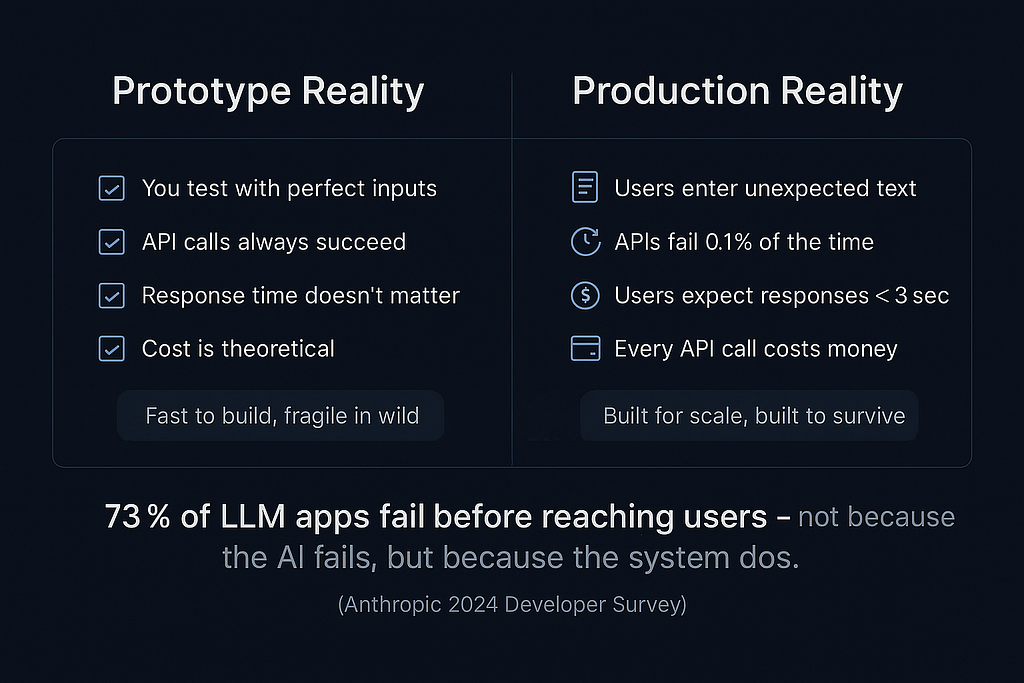
A production-ready application handles real-world conditions that prototypes never encounter. According to Anthropic’s 2024 Developer Survey, 73% of LLM applications fail before reaching users, not because the AI doesn’t work, but because the supporting systems break under real conditions.
Prototype Reality:
- You test with perfect inputs
- API calls always succeed
- Response time doesn’t matter
- Cost is theoretical
Production Reality:
- Users enter unexpected text
- APIs fail 0.1% of the time (which means 100 failures per 100,000 requests)
- Users expect responses in under 3 seconds
- Every API call costs money
The gap between these realities is what this guide bridges. We’ll transform your working prototype into a robust system that handles failure gracefully, controls costs automatically, and scales with demand.
2. Setting Up Your Development Environment
Before writing any code, establish a proper development environment that mirrors production conditions. This prevents the “it works on my machine” problem that derails many deployments.
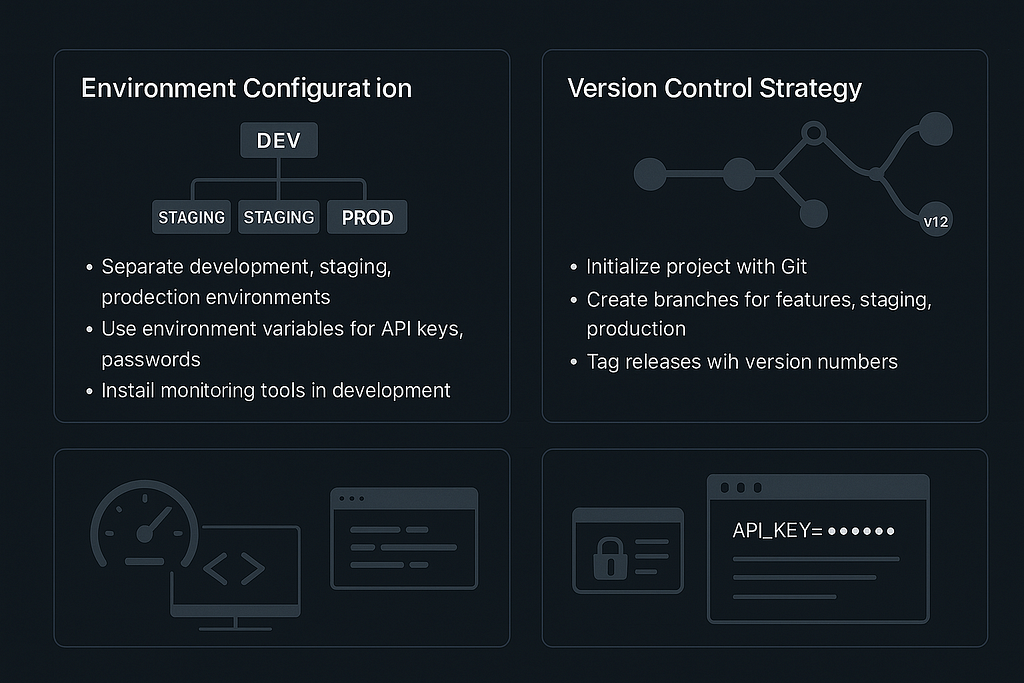
Environment Configuration
Create a project structure that separates development, staging, and production environments from day one. Each environment should have its own API keys, database connections, and configuration settings.
Your development setup should include environment variables for all sensitive information. Never hardcode API keys or passwords directly in your code. Use a .env file locally and proper secret management in production.
Install monitoring tools in your development environment. What you don’t measure during development, you can’t fix in production. Set up logging from the beginning, not as an afterthought when things break.
Version Control Strategy
Initialize your project with Git before writing your first line of code. Create separate branches for features, staging, and production. This branching strategy prevents untested code from reaching users and enables quick rollbacks when issues arise.
Tag your releases with semantic versioning. When a production issue occurs at 2 AM, you need to know exactly which version is running and what changed between releases.
3. Creating Your First Production-Ready LLM App
Start with a simple but complete application architecture. We’ll build a content generation API that demonstrates all production principles without unnecessary complexity.
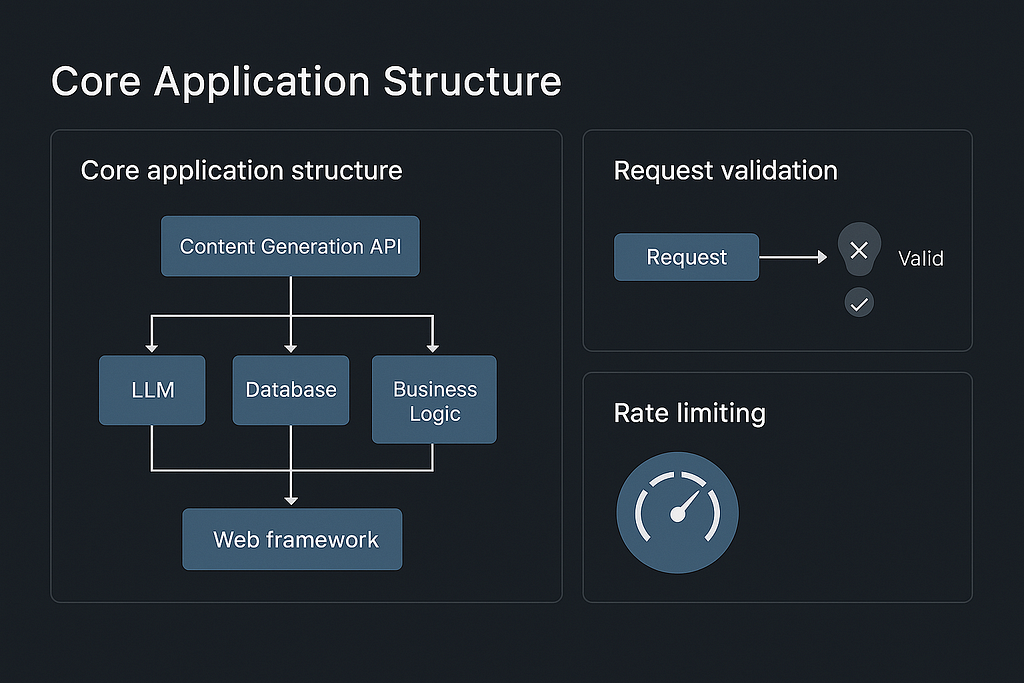
Core Application Structure
Design your application with clear separation of concerns. Your LLM interaction logic should be separate from your web framework, database operations, and business logic. This separation makes testing easier and enables you to swap components without rewriting everything.
Implement request validation from the start. Users will send empty requests, extremely long text, special characters, and malformed JSON. Your application should handle these gracefully with clear error messages rather than crashing or producing unexpected results.
Add rate limiting before you need it. Even during development, implement basic rate limiting to prevent accidental infinite loops or testing mistakes from consuming your entire API budget.
Database and State Management
Choose a database strategy that matches your application’s needs. For most LLM applications, you need to store user requests, API responses, and usage metrics. PostgreSQL provides excellent JSON support for storing LLM conversations while maintaining relational integrity for user management.
Implement connection pooling from the beginning. Database connections are expensive resources, and proper pooling prevents connection exhaustion as your application scales.
Design your database schema to support auditing. Store timestamps, user IDs, and request metadata for every operation. This data becomes invaluable for debugging issues, understanding user behavior, and optimizing performance.
4. Adding Error Handling and Reliability
Production systems fail in ways you never imagined during development. Robust error handling turns catastrophic failures into minor inconveniences.
Comprehensive Error Handling
Implement retry logic with exponential backoff for all external API calls. LLM APIs experience temporary outages, rate limiting, and network issues. Your application should retry failed requests with increasing delays to avoid overwhelming recovering services.
Create meaningful error messages for users. Instead of exposing technical errors like “HTTP 429 Rate Limited,” show user-friendly messages like “High demand detected. Please try again in 30 seconds.” Include a request ID that users can reference when contacting support.
Set up circuit breakers for external dependencies. When an API starts failing consistently, stop sending requests temporarily rather than continuing to make calls that will fail. This prevents cascading failures and reduces unnecessary costs.
Graceful Degradation
Design your application to provide partial functionality when components fail. If your main LLM API is down, can you serve cached responses or redirect to a backup model? If your database is unavailable, can you still process simple requests without storing results?
Implement health checks that verify all system components are working correctly. These checks should test actual functionality, not just service availability. A database that accepts connections but can’t execute queries is not healthy.
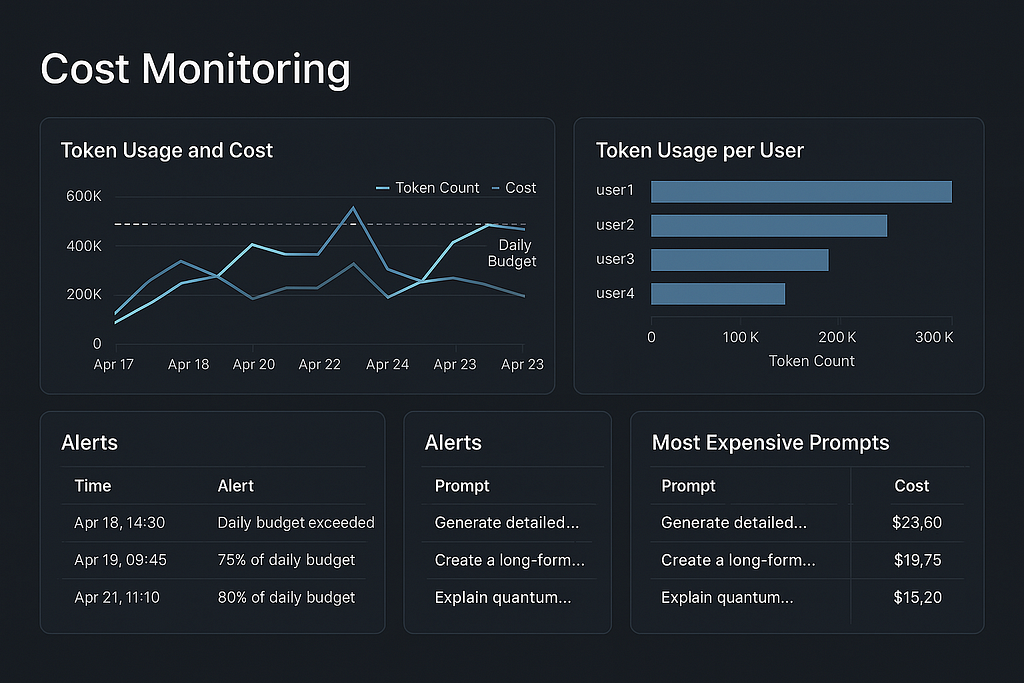
5. Implementing Cost Controls
LLM API costs can escalate quickly without proper controls. A single poorly designed prompt or unexpected usage spike can generate hundreds of dollars in charges overnight.
Usage Monitoring and Limits
Track token usage for every request and user. Store this data with timestamps to identify usage patterns, costly operations, and potential abuse. Set up alerts when usage approaches predefined thresholds.
Implement user-level spending limits with automatic cutoffs. When a user reaches their limit, gracefully deny additional requests with clear messaging about limit resets or upgrade options.
Monitor prompt efficiency regularly. Track the relationship between prompt length, response quality, and cost. Sometimes a longer, more specific prompt reduces overall costs by producing better results in fewer attempts.
Cost Optimization Strategies
Choose the right model for each task. Don’t use GPT-4 for simple classification tasks that GPT-3.5 can handle. Implement model selection logic that automatically chooses the most cost-effective option based on request complexity.
Implement response caching for repeated queries. Many users ask similar questions, and cached responses are both faster and free. Design your caching strategy to balance accuracy with cost savings.
6. Setting Up Monitoring and Alerts
You can’t manage what you don’t measure. Comprehensive monitoring provides early warning of issues and data for optimization decisions.
Essential Metrics
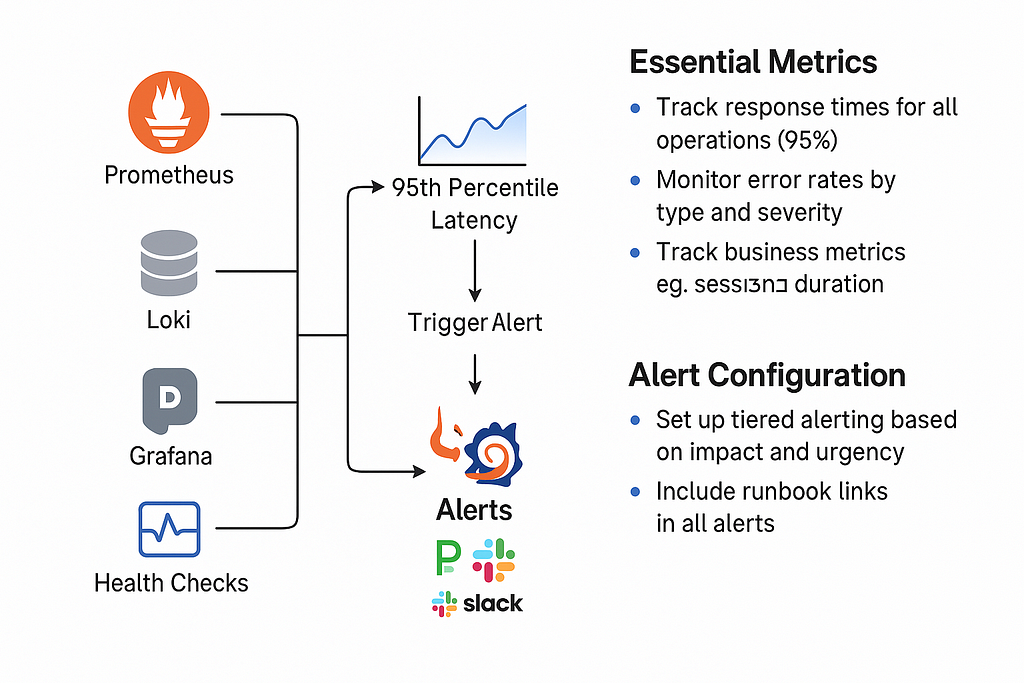
Track response times for all operations, not just LLM API calls. Users care about total response time, which includes database queries, processing time, and network latency. Set alerts for 95th percentile response times, not just averages.
Monitor error rates by type and severity. A 1% error rate might be acceptable for non-critical features but unacceptable for core functionality. Categorize errors to understand which require immediate attention versus those that can wait for the next sprint.
Track business metrics alongside technical metrics. Monitor user engagement, session duration, and feature usage. Technical metrics tell you how your system is performing, but business metrics tell you if it’s providing value.
Alert Configuration
Set up tiered alerting based on impact and urgency. Critical production issues should wake someone up, while minor performance degradations can wait until business hours. Configure alerts to escalate if initial notifications aren’t acknowledged.
Include runbook links in all alerts. When an alert fires at 3 AM, the on-call engineer should have immediate access to troubleshooting steps, common causes, and escalation procedures.
7. Deploying to Production
Production deployment is more than copying code to a server. Proper deployment practices prevent downtime and enable quick recovery from issues.
Deployment Strategy
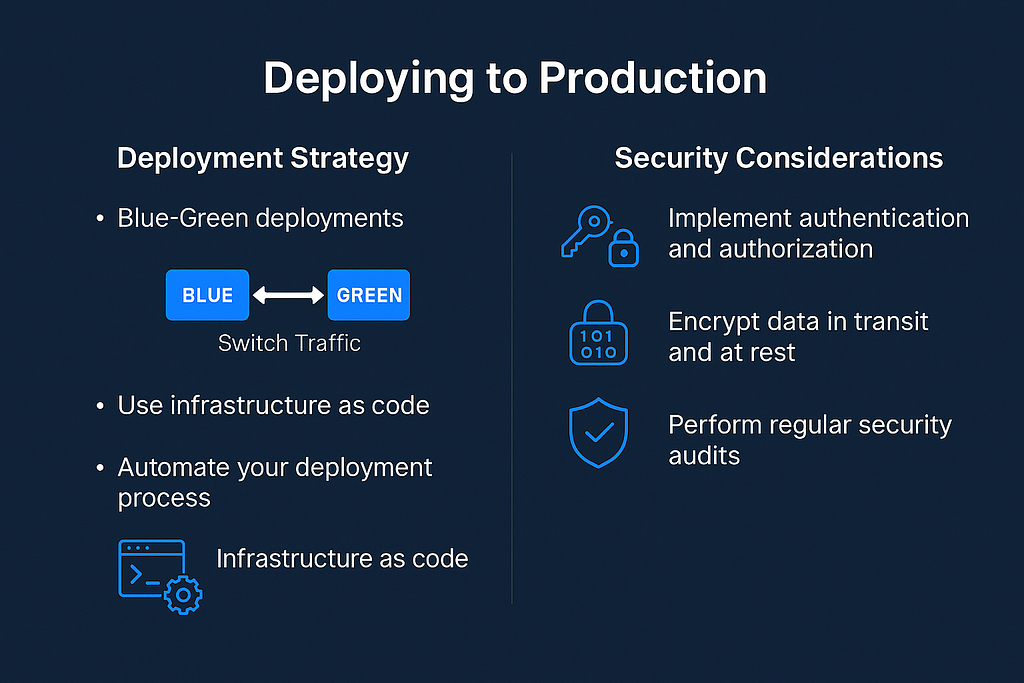
Implement blue-green deployments to eliminate downtime during updates. Run two identical production environments, deploy updates to the inactive one, test thoroughly, then switch traffic. This approach enables instant rollbacks if issues appear.
Use infrastructure as code to ensure consistent environments. Your production, staging, and development environments should be as similar as possible. Differences between environments are common sources of production only bugs.
Automate your deployment process completely. Manual deployments introduce human error and make rollbacks slower. Your deployment script should handle database migrations, environment updates, and health checks automatically.
Security Considerations
Implement proper authentication and authorization from day one. Even internal tools need security controls because they often become customer-facing faster than expected. Use industry-standard protocols like OAuth 2.0 rather than building custom authentication.
Encrypt all data in transit and at rest. This includes API communications, database storage, and backup files. Many regulations require encryption, and it’s much harder to add later than to implement initially.
Regular security audits should cover dependencies, configurations, and access controls. Automated tools can scan for known vulnerabilities, but manual reviews catch logic flaws and configuration issues that tools miss.
8. Testing Your Production System
Testing production systems requires different approaches than testing individual components. Focus on realistic scenarios and user behavior patterns.
Load Testing
Simulate realistic user behavior, not just maximum throughput. Real users think between requests, make mistakes, and use features in unexpected combinations. Your load tests should reflect these patterns rather than just hammering endpoints.
Test failure scenarios explicitly. Disconnect your database during load testing, simulate API timeouts, and test with invalid inputs. Your application should handle these gracefully under load, not just during development testing.
Monitoring During Testing
Watch your metrics carefully during load tests. Response times, error rates, and resource utilization should remain within acceptable ranges. Identify bottlenecks before they affect real users.
Test your alerting system during load testing. Alerts should fire when thresholds are exceeded, and they should provide actionable information. False alarms during testing are better than missed alerts in production.
9. Maintaining and Scaling
Production systems require ongoing maintenance and evolution. Plan for growth and changes from the beginning.
Performance Optimization
Monitor performance trends over time, not just current metrics. Gradual performance degradation is harder to notice but affects user experience significantly. Set up alerts for performance trends, not just absolute thresholds.
Optimize database queries regularly as data volume grows. Queries that perform well with thousands of records may become problematic with millions. Implement query monitoring and regular performance reviews.
Scaling Strategies
Design your application to scale horizontally from the beginning. Adding more servers should improve capacity linearly. Avoid architectural decisions that create scaling bottlenecks later.
Plan for traffic spikes and seasonal variations. If your application handles customer service queries, expect higher usage during business hours and peak seasons. Implement auto-scaling policies that handle predictable patterns.
10. Troubleshooting Common Issues
Production issues follow predictable patterns. Understanding common problems and their solutions reduces resolution time.
Common Performance Issues
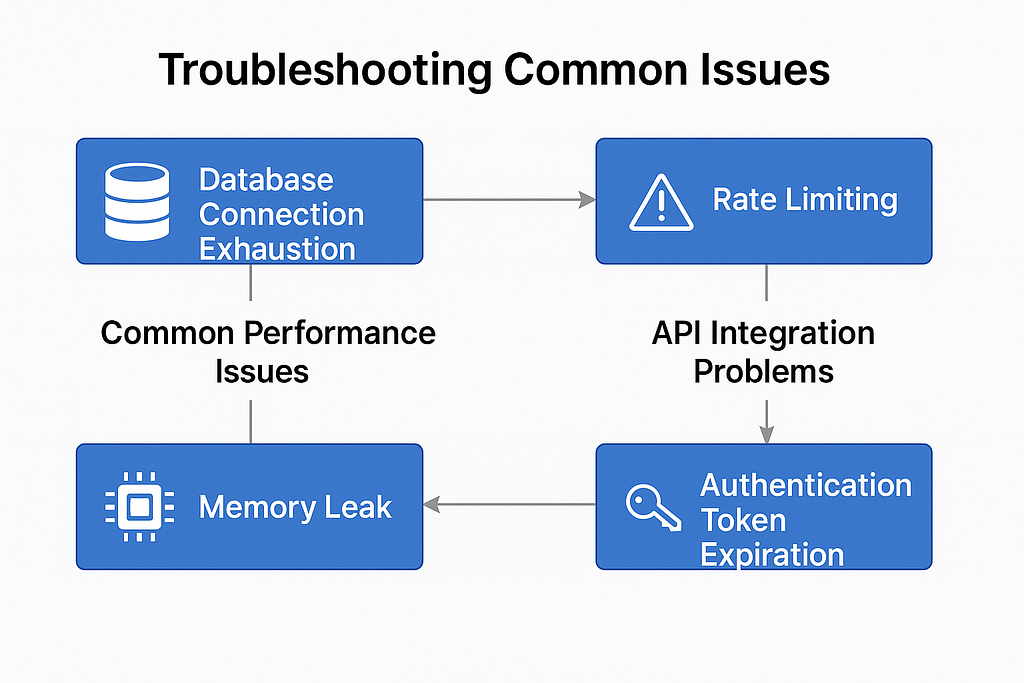
Database connection exhaustion often appears as mysterious timeouts and errors. Monitor connection pool usage and implement proper connection management. Set up alerts when connection pools approach capacity limits.
Memory leaks in long-running applications cause gradual performance degradation. Monitor memory usage trends and implement regular application restarts if necessary. Language-specific profiling tools can identify leak sources.
API Integration Problems
Rate limiting from external APIs affects many LLM applications. Implement proper backoff strategies and monitor your usage against API limits. Consider using multiple API keys or providers for redundancy.
Authentication token expiration causes intermittent failures that are difficult to reproduce. Implement automatic token refresh and proper error handling for authentication failures.
11. What’s Next?
Building production-ready LLM applications is an iterative process. Start with the fundamentals covered in this guide, then enhance based on your specific needs and user feedback.
Focus on reliability and user experience over feature quantity. A simple application that works consistently is more valuable than a complex application that fails unpredictably.
Continue learning about LLM developments, but don’t chase every new model or technique. Production systems value stability over cutting-edge features.
12. Code Examples and Implementation Details
Basic Production-Ready Flask Application Structure
# app.py
import os
import time
import logging
from flask import Flask, request, jsonify
from flask_limiter import Limiter
from flask_limiter.util import get_remote_address
import openai
from sqlalchemy import create_engine
from sqlalchemy.pool import QueuePool

# Configure logging
logging.basicConfig(level=logging.INFO)
logger = logging.getLogger(__name__)
app = Flask(__name__)

# Rate limiting
limiter = Limiter(
    app,
    key_func=get_remote_address,
    default_limits=["100 per hour"]
)

# Database connection with pooling
engine = create_engine(
    os.getenv('DATABASE_URL'),
    poolclass=QueuePool,
    pool_size=20,
    max_overflow=10
)

# OpenAI configuration
openai.api_key = os.getenv('OPENAI_API_KEY')

@app.route('/generate', methods=['POST'])
@limiter.limit("10 per minute")
def generate_content():
    try:
        # Validate request
        if not request.json or 'prompt' not in request.json:
            return jsonify({'error': 'Missing prompt'}), 400

        prompt = request.json['prompt']
        if len(prompt) > 1000:
            return jsonify({'error': 'Prompt too long'}), 400

        # Call OpenAI with error handling
        response = call_openai_with_retry(prompt)

        # Log usage for monitoring
        log_usage(prompt, response)

        return jsonify({'response': response})

    except Exception as e:
        logger.error(f"Error in generate_content: {str(e)}")
        return jsonify({'error': 'Internal server error'}), 500

def call_openai_with_retry(prompt, max_retries=3):
    for attempt in range(max_retries):
        try:
            response = openai.ChatCompletion.create(
                model="gpt-3.5-turbo",
                messages=[{"role": "user", "content": prompt}],
                max_tokens=150,
                timeout=30
            )
            return response.choices[0].message.content
        except openai.error.RateLimitError:
            if attempt < max_retries - 1:
                time.sleep(2 ** attempt)  # Exponential backoff
            else:
                raise
        except Exception as e:
            logger.error(f"OpenAI API error: {str(e)}")
            raise

def log_usage(prompt, response):
    # Log to database for monitoring
    with engine.connect() as conn:
        conn.execute("""
            INSERT INTO usage_logs (prompt_length, response_length, timestamp)
            VALUES (%s, %s, NOW())
        """, (len(prompt), len(response)))
Environment Configuration (.env file)
# Development
OPENAI_API_KEY=your_openai_key_here
DATABASE_URL=postgresql://user:password@localhost/llm_app_dev
ENVIRONMENT=development
LOG_LEVEL=DEBUG

# Production (use proper secret management)
OPENAI_API_KEY=prod_key_from_secret_manager
DATABASE_URL=postgresql://user:password@prod-db/llm_app
ENVIRONMENT=production
LOG_LEVEL=INFO
Docker Configuration
# Dockerfile
FROM python:3.9-slim
WORKDIR /app
COPY requirements.txt .
RUN pip install -r requirements.txt
COPY . .
EXPOSE 5000
CMD ["gunicorn", "--bind", "0.0.0.0:5000", "--workers", "4", "app:app"]
Database Schema
-- Create tables for production monitoring
CREATE TABLE usage_logs (
    id SERIAL PRIMARY KEY,
    user_id VARCHAR(255),
    prompt_length INTEGER,
    response_length INTEGER,
    tokens_used INTEGER,
    cost_cents INTEGER,
    response_time_ms INTEGER,
    timestamp TIMESTAMP DEFAULT NOW(),
    request_id VARCHAR(255)
);
CREATE TABLE error_logs (
    id SERIAL PRIMARY KEY,
    error_type VARCHAR(255),
    error_message TEXT,
    stack_trace TEXT,
    user_id VARCHAR(255),
    timestamp TIMESTAMP DEFAULT NOW()
);
-- Indexes for performance
CREATE INDEX idx_usage_logs_timestamp ON usage_logs(timestamp);
CREATE INDEX idx_usage_logs_user ON usage_logs(user_id);
Monitoring Setup with Prometheus
# monitoring.py

from prometheus_client import Counter, Histogram, generate_latest
REQUEST_COUNT = Counter('llm_requests_total', 'Total LLM requests')
REQUEST_DURATION = Histogram('llm_request_duration_seconds', 'Request duration')
ERROR_COUNT = Counter('llm_errors_total', 'Total errors', ['error_type'])
@app.route('/metrics')

def metrics():
    return generate_latest()
# Add to your route handlers
@REQUEST_DURATION.time()
def generate_content():
    REQUEST_COUNT.inc()
    # ... your existing code
13. Deployment Checklist
Before deploying to production, verify each item:
Pre-Deployment:
- All sensitive data stored in environment variables
- Database migrations tested in staging
- Rate limiting configured and tested
- Error handling covers all external API calls
- Logging captures all necessary information
- Health check endpoint returns accurate status
- Load testing completed with realistic scenarios
Security Checklist:
- HTTPS enabled with valid certificates
- API keys rotated and stored securely
- Database connections encrypted
- Input validation prevents injection attacks
- Authentication and authorization implemented
- Security headers configured (CORS, CSP, etc.)
Monitoring Setup:
- Application metrics collection enabled
- Error tracking and alerting configured
- Cost monitoring alerts set up
- Performance monitoring baseline established
- Log aggregation and search configured
14. Cost Management Strategies
Token Usage Tracking
def track_token_usage(prompt, response, model_name):
    # Estimate tokens (rough calculation)
    prompt_tokens = len(prompt.split()) * 1.3
    response_tokens = len(response.split()) * 1.3

    # Get cost per token for model
    cost_per_token = get_model_cost(model_name)
    total_cost = (prompt_tokens + response_tokens) * cost_per_token

    # Store in database
    with engine.connect() as conn:
        conn.execute("""
            INSERT INTO cost_tracking
            (user_id, prompt_tokens, response_tokens, cost_cents, model_name)
            VALUES (%s, %s, %s, %s, %s)
        """, (user_id, prompt_tokens, response_tokens, total_cost * 100, model_name))

def get_model_cost(model_name):
    costs = {
        'gpt-3.5-turbo': 0.002 / 1000,  # $0.002 per 1K tokens
        'gpt-4': 0.03 / 1000,           # $0.03 per 1K tokens
    }
    return costs.get(model_name, 0.002 / 1000)
Automatic Cost Alerts
def check_user_spending(user_id):
    with engine.connect() as conn:
        result = conn.execute("""
            SELECT SUM(cost_cents) as total_cost
            FROM cost_tracking
            WHERE user_id = %s AND date >= CURRENT_DATE
        """, (user_id))

        daily_spend = result.fetchone()[0] or 0

        if daily_spend > 1000:  # $10 daily limit
            send_cost_alert(user_id, daily_spend)
            return False  # Block further requests
        return True
15. References
OpenAI API Best Practices Guide
Docker Production Deployment Guide
Flask Production Configuration Guide
Prometheus and Grafana setup guides Log
Data encryption implementation guides
Originally published on medium.com.