
Mintlify vs GitBook vs Fumadocs: Which Docs Platform Fits Your AI Product?
You're building an AI product, and now you need a place to put the docs. Three names keep coming up: Mintlify, GitBook, and Fumadocs. Most comparisons of these tools open with a feature checklist, and the checklist rarely tells you which one to pick.
The right platform for an AI product depends less on AI feature count than on how your team authors, reviews, and maintains developer-facing content. GitBook fits teams that want collaborative, hosted workflows. Mintlify fits teams that want a polished, developer-first platform with AI-oriented publishing. Fumadocs fits engineering-led teams that want flexibility and control.
I checked the pricing and capability claims below against each platform's official documentation on September 15, 2026. One caveat covers everything that follows. Pricing, plan inclusions, and beta features change often, so treat every specific detail here as accurate on that date, not guaranteed for whenever you're reading this. This guide compares Mintlify, GitBook, and Fumadocs on authoring workflow, API documentation, collaboration, AI readiness, and cost, then tells you which one fits your team.
Key takeaways
Here are the facts everything else in this piece depends on, each tied to what's actually confirmed. The pricing and beta-feature caveat above still applies to all of them.
- GitBook documents bidirectional Git Sync and OpenAPI-generated reference pages.
- Mintlify ships an automatic MCP server and AI Agent for engineers-only authoring; its official pricing page lists Pro at $450 a month.
- Fumadocs is a free, open-source, self-hosted framework with no first-party AI or MCP layer documented; your team builds anything beyond the framework itself.
- None of the three platforms is a general knowledge base tool; all three center on developer documentation.
The real decision behind a docs platform
An AI product's docs serve more than one reader. Developers need a working API reference, and end users need clear guides. Internal teams need a shared source of truth. Increasingly, AI agents need documentation they can retrieve and act on.
Before naming a winner, judge each platform against the same gates: authoring model, API workflow, source control, collaboration, publishing, versioning, AI assistance, analytics, and ownership. GitBook, Mintlify, and Fumadocs represent genuinely different operating models. Platform fit matters more than feature count.
Mintlify vs GitBook vs Fumadocs at a glance
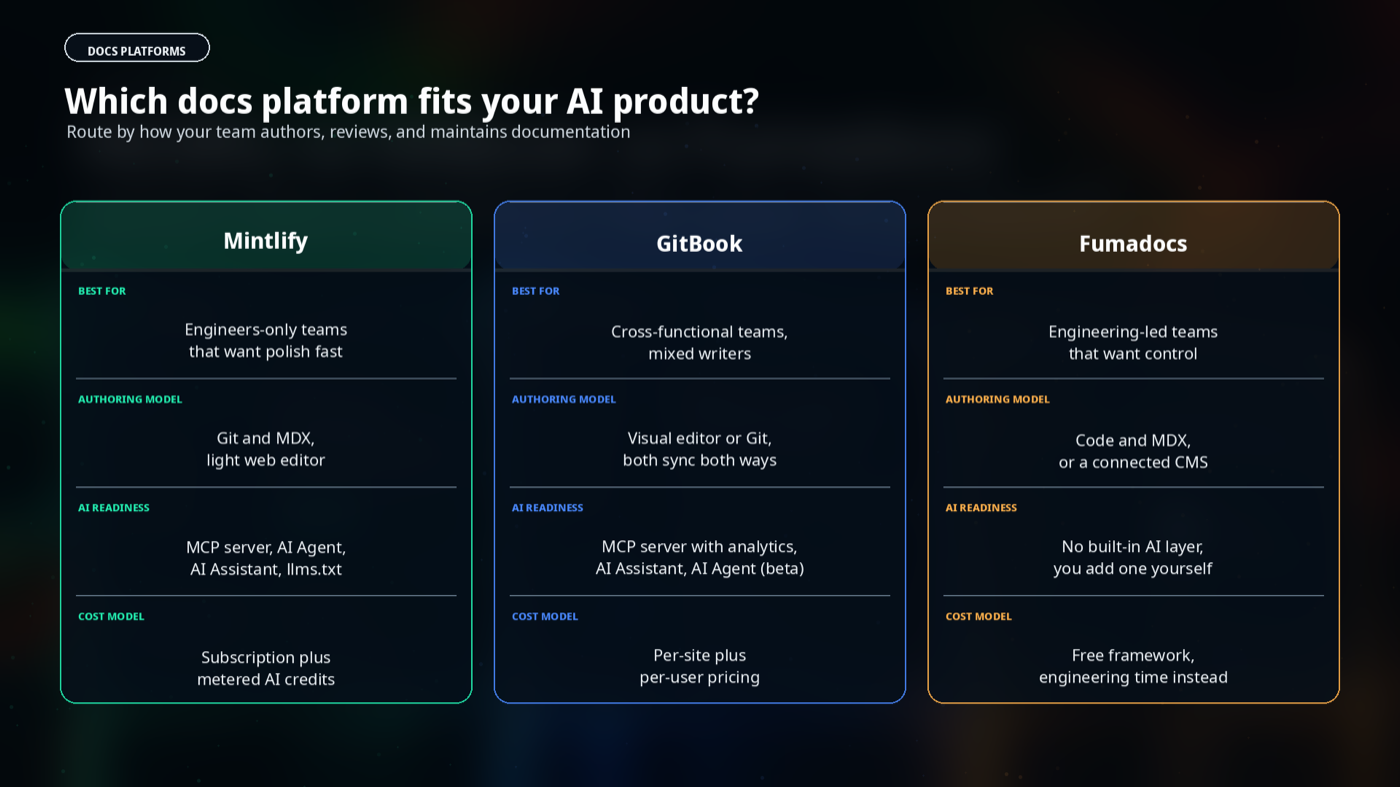
The table below scores each platform on the same criteria, side by side. Look at the detailed sections after it for the reasoning behind each score.
| Criterion | Mintlify | GitBook | Fumadocs |
|---|---|---|---|
| Operating model | Hosted, MDX-based | Hosted, visual editor plus Git | Self-hosted, open-source framework |
| Primary authoring path | Git and MDX, light web editor | Visual editor or Git, both sync | Code and MDX, or a connected CMS |
| API and OpenAPI fit | Auto-generated reference, Git-linked | Auto-generated reference with a live test playground | OpenAPI plugin with an interactive playground |
| Collaboration | Engineers, limited co-editing | Engineers and non-engineers, real-time co-editing | Engineers only |
| Versioning | Git-based | Git Sync; confirm version model | You build it |
| AI and agent-readiness | MCP server, AI Assistant, AI Agent, llms.txt | MCP server with analytics, AI Assistant, AI Agent in beta | No AI layer documented; confirm separately |
| Customization | Limited to the platform | Limited to the platform | Full, since it's your codebase |
| Best for | Engineering-only teams that want a polished, AI-native site fast | Cross-functional teams with mixed technical and non-technical writers | Engineering-led teams that want control and no lock-in |
Mintlify: best for polished, developer-first documentation with AI-oriented discovery
Mintlify optimizes for one outcome: a polished, agent-friendly documentation site with the least engineering effort. You write in MDX, connect a Git repository, and Mintlify handles hosting, deployment, and search. Every change goes through a pull request, so review follows your normal code-review process rather than a separate documentation workflow.
Every project gets an automatic MCP server, included even on the free tier. Pro adds an AI Agent that proposes documentation updates through pull requests. Mintlify's pricing page also lists platform and agent analytics as Pro features, though it doesn't specify what each one reports.
The web editor handles page content only, so structural changes still need code, and Mintlify doesn't support simultaneous co-editing. If your documentation authoring stays engineers-only and you want a fast, AI-native site, then Mintlify removes the most setup work of the three. Its pricing page lists Pro at $450 a month billed annually, plus metered AI credits.
GitBook: best for collaborative, hosted documentation workflows
GitBook pairs a Notion-style visual editor with bidirectional Git Sync to GitHub and GitLab. Product managers, support staff, and writers edit visually, and their changes flow back into the same repository engineers use.
GitBook documents bidirectional Git Sync between GitBook and GitHub or GitLab, with change requests and merge rules for review. Non-technical writers submit edits through the visual editor, and engineers review the same change as a pull request on the Git side.
GitBook auto-generates API reference pages from an OpenAPI spec with endpoint testing built into the reference. It also ships an embeddable AI Assistant, a beta AI Agent, and an MCP server. The documentation reviewed doesn't detail what its agent analytics measure.
If non-engineers own part of your documentation, then GitBook lowers the barrier for them to contribute. Real-time co-editing supports that reach, but a $12 per-user monthly fee on top of a per-site charge adds up as the team grows.
Fumadocs: best for engineering-led teams that want a composable docs stack
Fumadocs is a different kind of product. It's an open-source documentation framework built on Next.js and React, and you host it yourself. There's no subscription, because the framework is free.
It's source-agnostic, working with MDX, Content Collections, or a connected CMS such as BaseHub, Sanity, or Payload. Built-in search runs on Orama or Algolia, and the fumadocs-openapi package generates an interactive API playground straight from your OpenAPI spec.
The Fumadocs documentation reviewed doesn't describe a built-in AI assistant, MCP server, or hosted analytics, so your team would build any of that yourselves. Fumadocs' own site lists Unkey, Vercel, and Orama as teams building on it. That signals its audience: engineers who want their docs to live inside their own codebase.
The framework costs nothing to license, but the real cost sits in engineering time. You host it, maintain it, and build any AI or search layer beyond what ships by default. If your team has the capacity to own that work, then Fumadocs trades managed convenience for full control and zero lock-in.
Hosted platform or docs-as-code framework?
Don't treat docs-as-code as automatically superior to a hosted platform. Ask concrete questions instead: where does content live, who can review it, how do API changes get detected, and who owns deployment. None of these three tools is a general knowledge base platform built for support content. All three center on developer documentation.
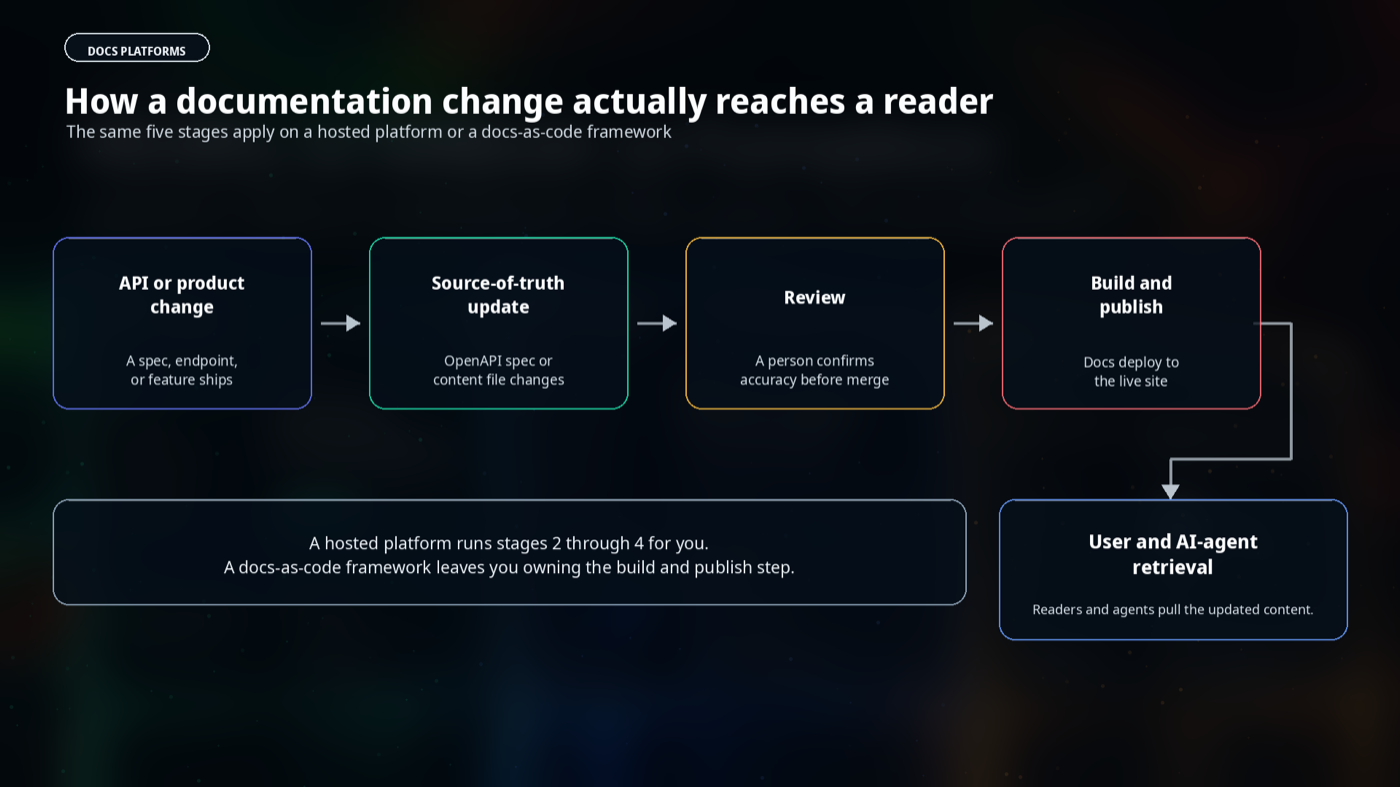
A small, engineering-led team with no one to spare for setup usually fits a hosted platform better. A cross-functional documentation team, or a regulated environment that needs strict review trails, often fits GitBook's model. A rapidly changing API product with an engineering team that already lives in Git tends to fit Fumadocs or Mintlify.
API documentation and OpenAPI support should decide your shortlist
AI products expose APIs, SDKs, webhooks, and frequently changing model behavior, so API documentation deserves the strongest weight in this decision. All three platforms generate reference pages from an OpenAPI spec.
GitBook's official documentation confirms that reference pages update automatically when a linked OpenAPI spec changes. The Mintlify documentation reviewed doesn't establish the same automatic trigger behavior. Fumadocs generates its reference through the OpenAPI plugin, but you control when and how that generation runs, since you own the build pipeline.
A strong API reference doesn't replace task-oriented guides, authentication walkthroughs, error handling, rate limits, and migration notes. Someone still has to own writing and updating that surrounding content by hand.
AI features help maintain documentation, but they do not establish accuracy
AI documentation features do four separate jobs: drafting, editing, retrieval, and flagging gaps in existing content. None of those four jobs replace human review.
GitBook's own workflow guidance is explicit about this: AI can draft and surface gaps, but a person still needs to confirm accuracy before publishing. The same caution applies to Mintlify's AI Agent and to any AI layer you add on top of Fumadocs.
An MCP server or an AI Assistant helps agents and readers retrieve your content faster. Neither one keeps that content correct when your product changes underneath it. Ask whether generated content can be edited, reviewed, versioned, and traced back to a source before you count any AI feature as documentation governance.
What an AI product should document
Before you evaluate any platform, fix your content inventory. Most AI products need a quickstart, an authentication guide, core concepts, an API reference, and worked examples.
They also need workflow guides, rate limits, error handling, a security overview, a changelog, migration guides, and troubleshooting content. Assign a maintenance owner and an update trigger, such as a schema change or a release, to each type.
This inventory stays the same no matter which platform you pick. Use it during evaluation to check whether a platform supports both structured reference content and explanatory guides equally well.
Pricing, migration, and ownership questions to resolve before choosing
Compare pricing only from each vendor's current pricing page, and note the date you checked it. GitBook publishes tiered pricing with a free plan, plus per-site and per-user costs on paid tiers.
Mintlify's pricing page lists Pro at $450 a month billed annually, plus metered AI credits. Fumadocs costs nothing to license, since it's an open-source framework, but budget engineering time for setup and ongoing maintenance instead of a subscription line.
Migration effort matters as much as sticker price. Markdown and MDX content usually ports between platforms with some cleanup. Git sync direction, custom domains, redirects, existing API references, and analytics history rarely move automatically. Mark any pricing or migration detail you can't verify as needing confirmation rather than guessing.
Decision matrix: which platform fits your AI product?
Route yourself by what your team actually needs, not by which platform has the longest feature list. The four outcomes below cover the realistic options, including staying where you are.
- Choose Mintlify when its verified publishing and AI features match your requirements, and your documentation authoring stays engineers-only.
- Choose GitBook when cross-functional collaboration, hosted publishing, and structured review workflows matter most.
- Choose Fumadocs when engineering control, composability, and OpenAPI-aware implementation matter most, and you can own the maintenance.
- Stay with your current platform when it already supports your source of truth and your documentation maintenance process.
Score your team against the same gates used throughout this guide before you commit. The worksheet below turns those gates into a quick self-check.
| Evaluation gate | Your answer |
|---|---|
| Authoring model | Who writes: engineers, non-engineers, or both? |
| Source of truth | Where does the canonical content live? |
| OpenAPI and API workflow | How often does your API spec change? |
| Review process | Who approves a documentation change before it publishes? |
| Deployment ownership | Who deploys documentation updates? |
| Versioning | Do you need parallel docs for multiple releases? |
| Customization | Does your docs site need custom rendering or structure? |
| AI assistance | Do you need a built-in AI Assistant or MCP server, or will you build one? |
| Analytics | Do you need AI-versus-human traffic data out of the box? |
| Migration | What would moving cost you in time and content cleanup? |
| Pricing | What does the platform cost at your team's current size, and in a year? |
| Maintenance responsibility | Who owns keeping this documentation accurate after launch? |
Fill in your own answers, then match them against the routing above. Most teams land on one platform clearly once the gates are answered honestly.
AI Software Documentation FAQs
These questions come up most often once a team starts comparing platforms. Each answer stays specific to the question rather than pitching any one product.
What is software documentation?
Software documentation is the set of guides, references, and explanations that help people and systems use a product correctly. It covers quickstarts, API references, conceptual guides, and troubleshooting content, and it serves developers, support teams, and increasingly AI agents.
What are software documentation tools?
Software documentation tools are platforms and frameworks that help teams write, organize, and publish technical content such as API references, guides, and release notes. They range from fully hosted platforms like Mintlify and GitBook to open-source frameworks like Fumadocs that a team builds and hosts itself.
Which documentation platform is best for an AI product?
No single platform wins for every AI product. Fit comes down to authoring model, API workflow, review ownership, and maintenance capacity. Mintlify suits engineering-only teams that want a polished, AI-oriented site fast. GitBook fits teams that mix engineers and non-engineer writers, and Fumadocs fits engineering-led teams that have the staff to maintain it and want full control.
Should AI engineering teams choose docs-as-code or a hosted platform?
That depends on who maintains your documentation and how much engineering time you can spare. Docs-as-code, such as Fumadocs, gives full control but requires you to build and maintain more of the stack yourself. A hosted platform trades some of that control for faster setup and less ongoing engineering work.
How can documentation support RAG systems and AI agents?
Documentation supports retrieval when it exposes clean, machine-readable formats such as llms.txt, per-page Markdown, or an MCP server that gives agents access to your content. Structured, consistently updated reference content can give an agent better material to retrieve, but accuracy still depends on indexing, retrieval configuration, freshness, and human validation.
Can AI keep software documentation current automatically?
Not fully. AI features can draft updates, flag gaps, and surface stale content faster than a person scanning manually. They cannot verify that a change matches what actually shipped, so a documentation owner still needs to review and confirm accuracy before publishing.
What documentation should an AI product maintain?
At minimum, a quickstart, an authentication guide, core concepts, a full API reference, and worked examples. Add rate limits, error handling, a changelog, migration guides, and troubleshooting content as the product matures. Assign an owner and an update trigger to each type.
Can I edit documentation generated by AI?
You can edit AI-generated content on all three, but the mechanism differs. Mintlify and GitBook route AI drafts through their own documented review workflow, subject to your plan. Fumadocs is a framework, so editing depends entirely on the content source and review pipeline your team builds.
I write API documentation, OpenAPI specifications, and developer content for AI and developer-tooling companies. View my documentation and API-writing portfolio to see related work. If your team could use help with API documentation, OpenAPI specs, or software documentation, then I'd love to hear from you. I also take on AI marketing content for developer and end-user companies.