
How to Rewrite a Transformer Model: Step-by-Step Customization of LLM Architectures
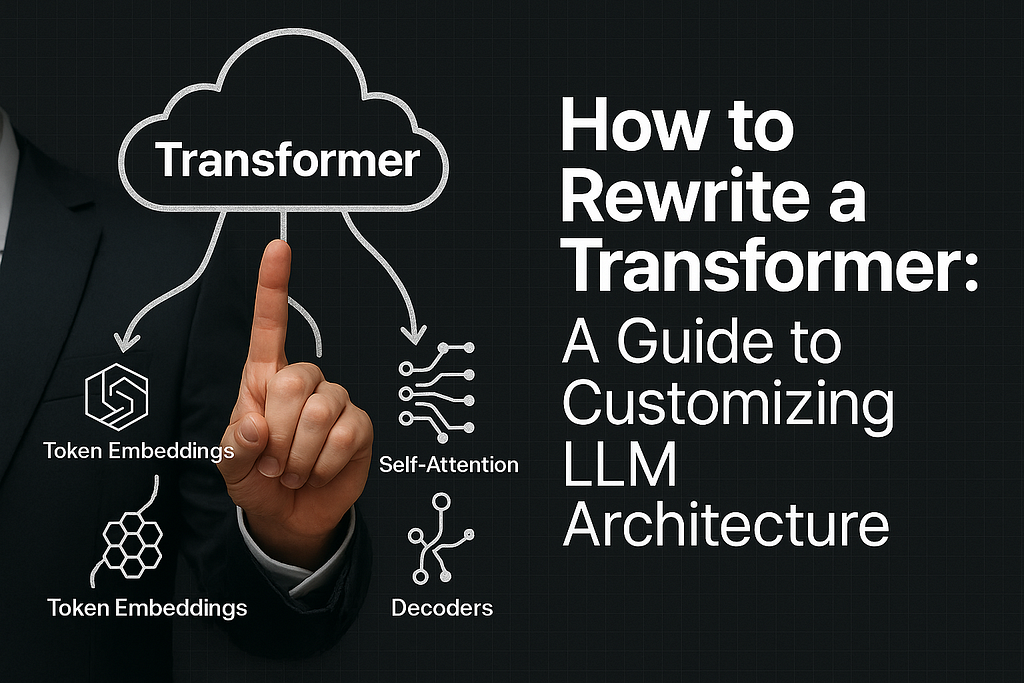
Transformer models are everywhere now, powering popular tools like ChatGPT, Google Translate, GitHub Copilot, Claude, and even image generators. But what happens when the default architecture isn’t quite right for your task? What if you need something lighter, faster, more accurate, or just… different?
That’s where rewriting comes in.
In this guide, you’ll learn how to build your own Transformer model using PyTorch, from attention mechanisms to encoder-decoder architecture. This practical guide includes Explanations, real-time code, and everything you need whether you’re just starting out or scaling up your ML skills.
Even if you’re injecting domain-specific logic, tweaking attention, or experimenting with novel architectures, this tutorial walks you through the process step by step.
Prerequisites
- Basic understanding of neural networks
- Familiarity with Python programming
- Working knowledge of PyTorch or TensorFlow
- Understanding of basic NLP concepts
- Access to a GPU (local or cloud-based) for training
But before we move to the code implementations, let’s understand this few concepts, so we’ll build with understanding.
What’s a Transformer?
Here’s what you need to know, Transformers are just like an engine, they’re really good at paying attention.
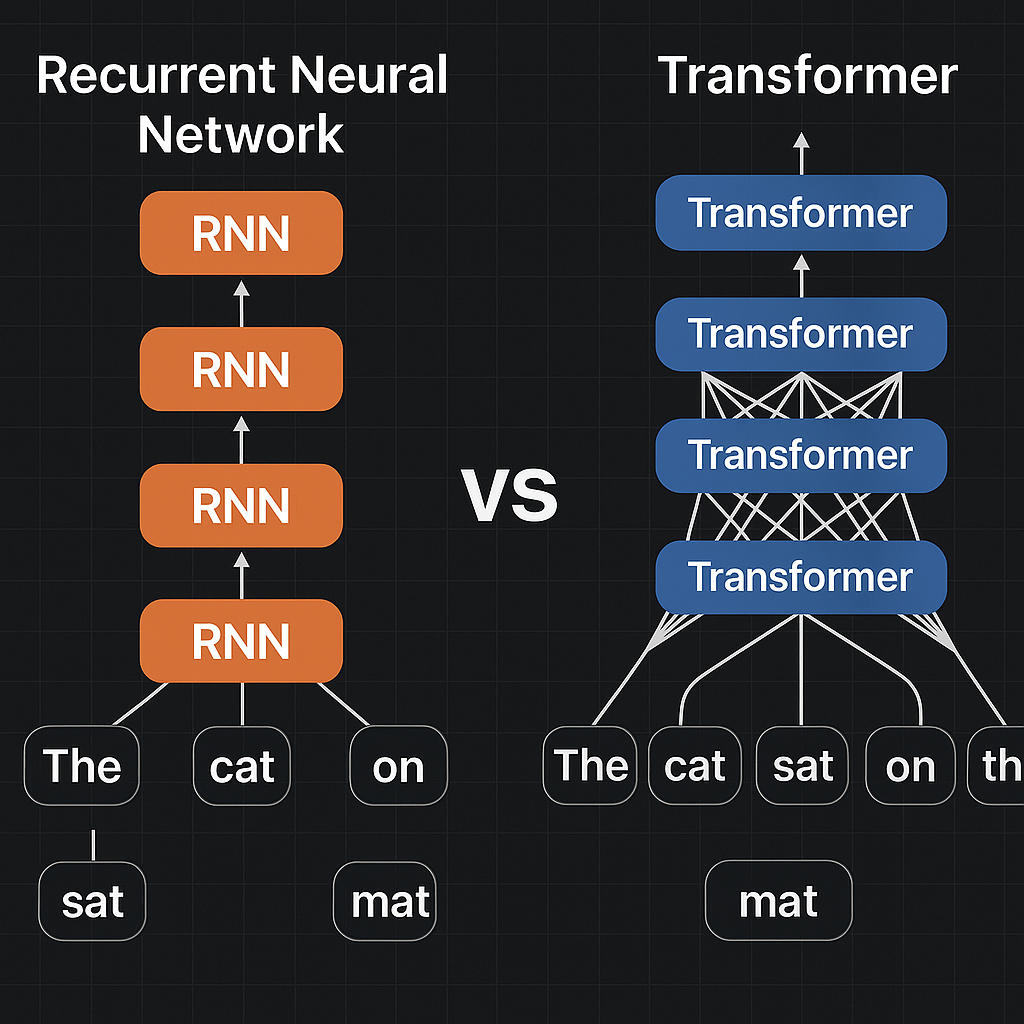
Transformers were first introduced in a 2017 paper titled “Attention Is All You Need”. Since then, they’ve completely changed the way computers understand and use language, moving us from the old, rule-based methods to powerful AI models that can write, translate, summarize, and even hold conversations like humans. Instead of processing words one at a time like older models (RNNs, LSTMs), transformers look at whole sequences at once using something called self-attention. That’s what allows models like ChatGPT to write essays, summarize text, or debug your code.
What Are Transformer Models and LLMs?
Transformer models are neural networks built on the transformer architecture. They’re designed to process and understand sequences like sentences, paragraphs, or even code by paying attention to how each part relates to every other part. That “attention” mechanism is the secret sauce that lets them understand meaning, context, and structure in a way older models couldn’t.
So, what’s the difference between transformers and LLMs?
Think of transformers as the core building blocks, like an engine. And LLMs (Large Language Models) are powerful machines built with those engines. LLMs like GPT-4.o, Claude, and PaLM are made by stacking multiple transformer layers, training them on huge amounts of text, and fine-tuning them to handle complex tasks like writing stories, answering questions, or generating code.
In simple terms:
Transformer = architecture (like the blueprint)
LLM = trained model (like a smart assistant powered by that blueprint)
Together, they’re what make today’s AI systems feel so human, they can generate content, solve problems, and even hold nuanced conversations.
But here’s the exciting part: these models aren’t one-size-fits-all. You can take a transformer or LLM, modify its layers, adjust its components, and fine-tune it to fit your unique use case.
How Transformers Work
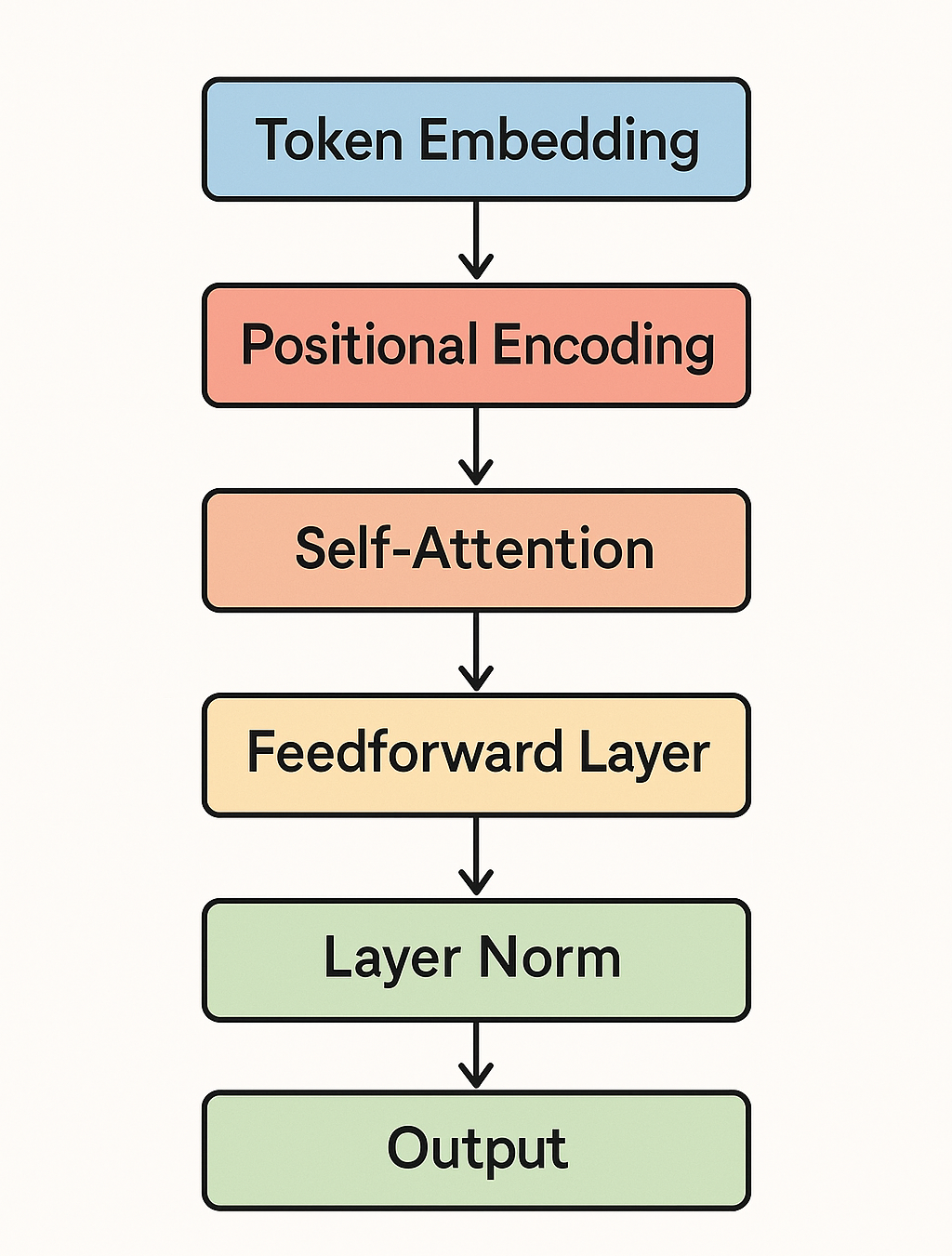
Transformers are built on two main parts: encoders (to understand input) and decoders (to generate output). What makes them powerful is the combination of these internal systems:
- Token Embeddings
Text is broken into tokens (words or parts of words), then turned into vectors the model can understand. - Positional Encoding
Since tokens lose order when converted to vectors, we add a signal to tell the model their position in the sentence. - Self-Attention
The model checks how important each word is in relation to every other word, this helps it understand context. - Feed-Forward Layers
A simple neural network adds more depth and non-linearity after attention. - Layer Normalization
Keeps training stable by normalizing outputs. - Multi-Head Attention
Instead of attending to one pattern at a time, the model attends to multiple patterns simultaneously.
Transformers learn context by weighing relationships between words, not just reading in order.
Why Rewrite a Transformer Model?
Sometimes we need to go beyond general-purpose models. Rewriting or customizing transformers allows for better performance in specific use cases.
1. Domain Adaptation
Generic models often miss key domain-specific meanings. Rewriting lets you train on specialized data, like legal terms, medical texts, or code.
Example: PubMedBERT outperformed regular BERT by 3.7% on medical tasks by focusing on biomedical text.
“A model that speaks the domain’s language performs more accurately.”
2. Efficiency Requirements
Big models are expensive and slow. For mobile or low-resource use, we need smaller, faster models.
Example: MobileBERT cut model size by 75% while keeping most of its performance.
“Optimizing for speed and size doesn’t mean sacrificing quality.”
3. Experimentation
Researchers often rewrite transformers to test new ideas, like better reasoning or reduced hallucination.
“Innovation in AI starts by questioning the architecture itself.”
4. Specialized Features
Tasks like long-form memory or better dialogue may require architectural tweaks, like Longformer for long text or Claude for instruction following.
What You Can Modify in a Transformer
When rewriting a transformer, these are the core areas to consider:
1. Attention Mechanism
This decides what the model should focus on.
You can customize with:
- Sparse Attention, Faster by skipping unnecessary words
- Global Tokens, Always visible to all tokens (great for summaries)
- Multi-Query Attention, Faster generation by sharing keys/values
“Attention determines what the model understands, and how efficiently it learns.”
2. Model Dimensions
These affect how much the model can learn.
- Embedding Size, Bigger vectors = richer understanding
- Number of Layers, More depth = better learning
- Number of Heads, More heads = diverse perspectives
“Model size and depth must match the complexity of the task.”
3. Tokenization
How you split text into tokens affects everything downstream.
- Subword or Character-Level, Helps with rare words
- Custom Tokens, Useful for special structures (like <USER>, <PRODUCT>)
“Good tokenization helps the model understand structure and meaning.”
4. Positional Encoding
Transformers don’t read left to right. Positional encodings inject order into the input.
- Absolute, Fixed positions
- Relative, More flexible for variable-length input
- ALiBi / RoPE, Helps with longer sequences
“Without position, there’s no context.”
5. Normalization & Activation
These help with training quality and performance.
- Layer Norm (Pre vs Post), Stability vs flexibility
- Activation (GELU, SwiGLU), Affects how the model interprets signals
- RMSNorm, ScaleNorm, Improve training on large models
6. Architecture Type
Choose structure based on your task:
- Encoder-only (BERT), Best for classification and QA
- Decoder-only (GPT), Best for generation
- Encoder-Decoder (T5), Best for translation or summarization
- Mixture of Experts, Activates different modules for different inputs (efficient at scale)
Now that you have a strong understanding on Transformers, let’s start with the customization
Tools and Frameworks for Customizing Transformers
For rewriting transformers, you’ll need the right tools. Here are the most important ones:
PyTorch
The most popular framework for research-oriented transformer development, offering flexibility and intuitive design.
import torch
import torch.nn as nn
Hugging Face Transformers
An ecosystem that simplifies working with transformer models:
from transformers import AutoModel, AutoConfigJAX/Flax
Google's framework for high-performance machine learning, particularly useful for TPU acceleration:
import jax
import flax
Additional Tools
- PyTorch Lightning: Simplifies training loops and distributed training
- Weights & Biases: For experiment tracking
- NVIDIA Apex: For mixed precision training
- DeepSpeed: Microsoft's library for large model training optimization
Step 1: Define Your Goals
Before writing any code, clarify:
- What specific limitations are you addressing?
- What metrics will define success?
- What constraints (compute, deployment, etc.) must you work within?
For example, if your goal is to process longer documents with limited GPU memory, you might focus on attention mechanism modifications like sparse attention patterns.
Step 2: Start From an Existing Implementation
Rather than coding from scratch, start with a solid foundation. The Hugging Face Transformers library is ideal for this.
Here’s how to examine an existing architecture:
from transformers import AutoConfig, GPT2Config
# Load configuration of an existing model
base_config = AutoConfig.from_pretrained("gpt2")
# Print the architecture parameters
print(base_config)
This is a bit technical but trust me, if you follow along carefully, you’ll get it. This code reveals the exact parameters of the GPT-2 model, giving you a blueprint to modify.
Step 3: Implement Custom Attention Mechanism
Let’s implement a custom attention mechanism as an example. Here we’ll create a simple sparse attention pattern that only attends to the most recent tokens:
import torch
import torch.nn as nn
import torch.nn.functional as F
import math

class SparseLocalAttention(nn.Module):
    def __init__(self, hidden_size, num_heads, attention_window=512):
        super().__init__()
        self.hidden_size = hidden_size
        self.num_heads = num_heads
        self.attention_window = attention_window
        self.head_dim = hidden_size // num_heads
# Query, Key, Value projections
        self.q_proj = nn.Linear(hidden_size, hidden_size)
        self.k_proj = nn.Linear(hidden_size, hidden_size)
        self.v_proj = nn.Linear(hidden_size, hidden_size)
        self.out_proj = nn.Linear(hidden_size, hidden_size)
    def forward(self, hidden_states, attention_mask=None):
        batch_size, seq_length, _ = hidden_states.size()
# Project queries, keys, values
        q = self.q_proj(hidden_states).view(batch_size, seq_length, self.num_heads, self.head_dim)
        k = self.k_proj(hidden_states).view(batch_size, seq_length, self.num_heads, self.head_dim)
        v = self.v_proj(hidden_states).view(batch_size, seq_length, self.num_heads, self.head_dim)
# Transpose for attention computation
        q = q.transpose(1, 2)# (batch_size, num_heads, seq_length, head_dim)
        k = k.transpose(1, 2)
        v = v.transpose(1, 2)
# Compute attention scores
        attention_scores = torch.matmul(q, k.transpose(-1, -2)) / math.sqrt(self.head_dim)
# Create sparse attention mask (only attend to nearby tokens)
        local_mask = torch.ones(seq_length, seq_length, device=hidden_states.device)
        for i in range(seq_length):
            start = max(0, i - self.attention_window)
            local_mask[i, :start] = 0# Mask tokens outside the window
# Apply sparse local mask
        attention_scores = attention_scores.masked_fill(
            local_mask.unsqueeze(0).unsqueeze(0) == 0, -10000.0
        )
# Apply input attention mask if provided
        if attention_mask is not None:
            attention_scores = attention_scores + attention_mask
# Convert scores to probabilities
        attention_probs = F.softmax(attention_scores, dim=-1)
# Apply attention
        context = torch.matmul(attention_probs, v)
        context = context.transpose(1, 2).contiguous()
        context = context.view(batch_size, seq_length, self.hidden_size)
# Output projection
        output = self.out_proj(context)
        return output
Step 4: Replace Components in the Transformer Block
Now, integrate your custom attention mechanism into the transformer block:
class CustomTransformerBlock(nn.Module):
    def __init__(self, config):
        super().__init__()
        self.attention = SparseLocalAttention(
            hidden_size=config.hidden_size,
            num_heads=config.num_attention_heads,
            attention_window=512
        )
        self.layer_norm1 = nn.LayerNorm(config.hidden_size)
        self.mlp = nn.Sequential(
            nn.Linear(config.hidden_size, config.intermediate_size),
            nn.GELU(),
            nn.Linear(config.intermediate_size, config.hidden_size)
        )
        self.layer_norm2 = nn.LayerNorm(config.hidden_size)
def forward(self, hidden_states, attention_mask=None):
# Pre-norm architecture (improved training stability)
        residual = hidden_states
        hidden_states = self.layer_norm1(hidden_states)
        hidden_states = self.attention(hidden_states, attention_mask)
        hidden_states = residual + hidden_states
# MLP block with residual connection
        residual = hidden_states
        hidden_states = self.layer_norm2(hidden_states)
        hidden_states = self.mlp(hidden_states)
        hidden_states = residual + hidden_states
        return hidden_states
Step 5: Assemble the Full Model
Combine your custom blocks into a complete model:
class CustomTransformerModel(nn.Module):
    def __init__(self, config):
        super().__init__()
        self.config = config
# Token embeddings
        self.token_embeddings = nn.Embedding(config.vocab_size, config.hidden_size)
# Positional embeddings
        self.position_embeddings = nn.Embedding(config.max_position_embeddings, config.hidden_size)
# Embedding dropout
        self.dropout = nn.Dropout(config.hidden_dropout_prob)
# Transformer layers
        self.layers = nn.ModuleList([
            CustomTransformerBlock(config) for _ in range(config.num_hidden_layers)
        ])
# Final layer norm
        self.layer_norm = nn.LayerNorm(config.hidden_size)
# Language modeling head
        self.lm_head = nn.Linear(config.hidden_size, config.vocab_size, bias=False)
    def forward(self, input_ids, attention_mask=None, labels=None):
        batch_size, seq_length = input_ids.size()
# Create position IDs
        position_ids = torch.arange(seq_length, dtype=torch.long, device=input_ids.device)
        position_ids = position_ids.unsqueeze(0).expand(batch_size, -1)
# Get embeddings
        inputs_embeds = self.token_embeddings(input_ids)
        position_embeds = self.position_embeddings(position_ids)
# Add embeddings and apply dropout
        hidden_states = inputs_embeds + position_embeds
        hidden_states = self.dropout(hidden_states)
# Process through transformer layers
        for layer in self.layers:
            hidden_states = layer(hidden_states, attention_mask)
# Apply final layer norm
        hidden_states = self.layer_norm(hidden_states)
# Compute logits
        logits = self.lm_head(hidden_states)
# Compute loss if labels provided
        loss = None
        if labels is not None:
# Shift so that tokens < n predict n
            shift_logits = logits[..., :-1, :].contiguous()
            shift_labels = labels[..., 1:].contiguous()
# Calculate cross entropy loss
            loss_fct = nn.CrossEntropyLoss()
            loss = loss_fct(shift_logits.view(-1, self.config.vocab_size), shift_labels.view(-1))
        return {"loss": loss, "logits": logits} if loss is not None else {"logits": logits}
Step 6: Configure and Initialize Your Model
Set up the configuration for your custom model:
from transformers import GPT2Config, GPT2Tokenizer

# Create custom configuration
custom_config = GPT2Config(
    vocab_size=50257,# Standard GPT-2 vocabulary size
    n_positions=2048,# Extended context length
    n_ctx=2048,# Context window size
    n_embd=768,# Embedding dimension (for a medium-sized model)
    n_layer=12,# Number of transformer layers
    n_head=12,# Number of attention heads
    hidden_dropout_prob=0.1,
    max_position_embeddings=2048,
    intermediate_size=3072# MLP hidden layer size
)

# Initialize model with custom config
model = CustomTransformerModel(custom_config)

# Load the tokenizer
tokenizer = GPT2Tokenizer.from_pretrained("gpt2")
Step 7: Train or Fine-tune Your Model
Now set up a training loop:
import torch.optim as optim
from torch.utils.data import DataLoader, Dataset

# Sample dataset class (you'll need to implement this for your specific data)
class TextDataset(Dataset):
    def __init__(self, texts, tokenizer, max_length):
        self.encodings = tokenizer(texts, truncation=True, padding="max_length",
                                   max_length=max_length, return_tensors="pt")

    def __getitem__(self, idx):
        item = {key: val[idx] for key, val in self.encodings.items()}
        item["labels"] = item["input_ids"].clone()
        return item

    def __len__(self):
        return len(self.encodings["input_ids"])

# Training function
def train(model, dataloader, optimizer, device, epochs=3):
    model.train()
    model.to(device)

    for epoch in range(epochs):
        epoch_loss = 0

        for batch in dataloader:
# Move batch to device
            batch = {k: v.to(device) for k, v in batch.items()}

# Zero gradients
            optimizer.zero_grad()

# Forward pass
            outputs = model(
                input_ids=batch["input_ids"],
                attention_mask=batch["attention_mask"],
                labels=batch["labels"]
            )

            loss = outputs["loss"]

# Backward pass
            loss.backward()

# Update parameters
            optimizer.step()

            epoch_loss += loss.item()

        print(f"Epoch {epoch+1}, Loss: {epoch_loss / len(dataloader)}")

# Setup training
device = torch.device("cuda" if torch.cuda.is_available() else "cpu")
optimizer = optim.AdamW(model.parameters(), lr=5e-5)

# Example usage (you would replace this with your actual dataset)
sample_texts = ["This is an example sentence to train the model on."] * 100
dataset = TextDataset(sample_texts, tokenizer, max_length=512)
dataloader = DataLoader(dataset, batch_size=8, shuffle=True)

# Start training
train(model, dataloader, optimizer, device)
Step 8: Evaluate and Iterate
After training, evaluate your model on relevant benchmarks:
def evaluate(model, dataloader, device):
    model.eval()
    model.to(device)

    total_loss = 0
    with torch.no_grad():
        for batch in dataloader:
            batch = {k: v.to(device) for k, v in batch.items()}

            outputs = model(
                input_ids=batch["input_ids"],
                attention_mask=batch["attention_mask"],
                labels=batch["labels"]
            )

            total_loss += outputs["loss"].item()

    return total_loss / len(dataloader)

# Run evaluation
eval_loss = evaluate(model, eval_dataloader, device)
print(f"Evaluation loss: {eval_loss}")
Based on results, iterate on your architecture design, focusing on components that most affect performance.
Best Practices When Modifying LLMs
Rewriting transformers is as much art as science. Here are best practices from industry experts:
Verify Against Baselines
Always compare your modifications against the original model using the same evaluation protocol. This ensures your changes actually improve performance, not just change it.
Meta AI researchers use this approach when developing new attention mechanisms, always comparing against vanilla attention on the same datasets (Fan et al., 2023).
Incremental Changes
Modify one component at a time and measure its impact before moving on. This makes debugging easier and helps identify which changes contribute most to improvements.
Parameter Efficiency
Consider techniques that add minimal parameters while maximizing impact:
- Adapter layers: Small modules inserted between transformer layers
- LoRA (Low-Rank Adaptation): Factorizing weight updates into low-rank matrices
- Parameter-efficient fine-tuning: Methods like Prompt Tuning or Prefix Tuning
OpenAI researchers found that certain architectural components like layer normalization had outsized impacts on performance relative to their parameter count (Radford et al., 2019).
Document Everything
Keep detailed notes on:
- What you changed and why
- What worked and what didn't
- Performance impacts (both positive and negative)
- Unexpected behaviors
Testing and Validation
Create comprehensive test suites that validate:
- Model correctness (outputs make sense)
- Performance improvements
- Memory efficiency
- Training stability
- Edge cases and robustness
Reproducibility
Ensure your experiments are reproducible by:
- Using fixed random seeds
- Documenting hardware specifications
- Tracking all hyperparameters
- Versioning your code
Common Mistakes
- Improper initialization: Pay special attention to how new components are initialized
- Ignoring numerical stability: Watch for exploding/vanishing gradients with custom architectures
- Insufficient evaluation: Testing only on the main metric without checking for regressions elsewhere
- Overlooking inference costs: Optimizing only for training while creating inference bottlenecks
Final Thoughts
Transformers are powerful, no doubt. But their real potential are revealed when you understand how they work, and how you can shape them to fit your needs. Whether you’re fine-tuning for a niche domain, trimming down for speed, or experimenting with entirely new ideas, rewriting a transformer isn’t just about code, it’s about creativity and control.
So don’t be afraid to tweak, test, and rebuild. That’s how innovation happens.
“Once you understand the blueprint, you’re free to redesign the building.”
References
Originally published on medium.com.